
When people start digitizing old family photos, one of the first questions they ask is:
“What’s the difference between Photomyne’s regular enhancements and Magic Restore?”
The answer is simple: both tools help improve old photos, but they work in very different ways - and they’re designed for different levels of restoration.
Core Enhancements (Included in Membership)
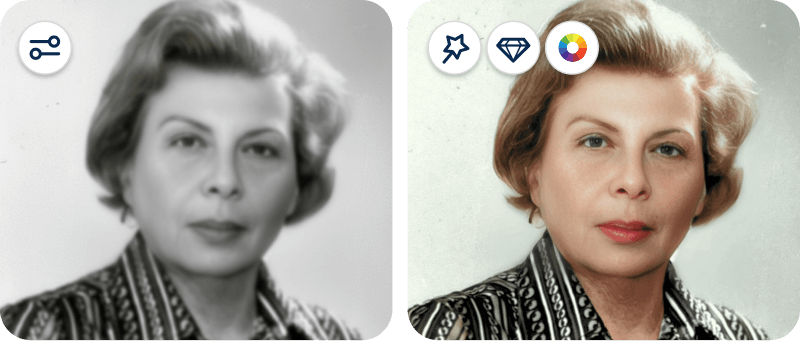
Every photo scanned with Photomyne automatically goes through a set of built-in enhancements designed to improve image quality right away.
As part of the scanning process, your photos are automatically:
✔️ Cropped
✔️ Color-balanced
✔️ Perspective-corrected
From there, you can continue editing manually by tapping the edit icon at the top of the screen.
Inside the editing tools, you can:
✔️ Sharpen details
✔️ Apply filters and adjust colors
✔️ Colorize black-and-white photos
Everything in this stage is part of Photomyne’s core enhancement tools, and you stay fully in control of the final result. You can keep edits subtle and natural, experiment with stronger enhancements, or return to the original version at any time.
Magic Restore (Advanced AI – Pay Per Use)
Currently only available on iOS.
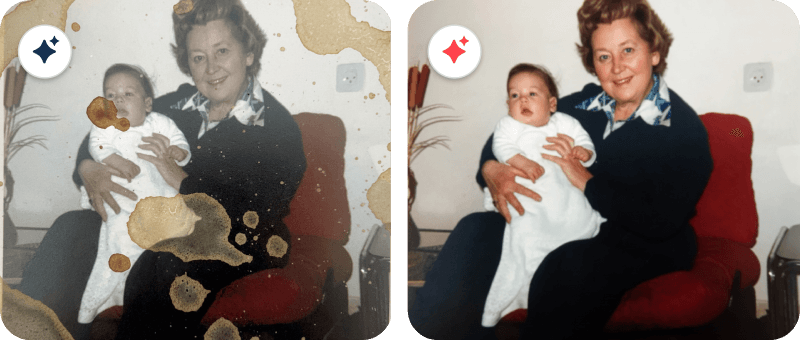
Magic Restore is designed for photos that need a deeper level of repair.
Unlike the standard editing tools, Magic Restore uses powerful external AI technology (including systems such as Google Vertex AI) to intelligently restore old and damaged photos. Because of the advanced AI processing involved, this feature is offered as a pay-per-use tool.
With Magic Restore, you have more control over the type of restoration you want to apply.
You can choose to:
✔️ Remove glare
✔️ Remove shadows and reflections
✔️ Fix scratches and tears
✔️ Revive faded colors
✔️ Sharpen blurry photos
For larger projects, Magic Restore also remains the best option for batch processing multiple photos in an album automatically.
Photomyne applies predefined restoration prompts specifically designed for old family photos, helping make the process simple, seamless, and accessible even for heavily damaged images.
Important note:
Because AI restoration rebuilds unclear or damaged areas of an image, it sometimes has to estimate missing details. In certain cases - especially with faces - restored features may appear slightly different from the original photo.
So which option should you use?
For lightly faded photos, Photomyne’s built-in core enhancements are often more than enough to create beautiful results.
For more heavily damaged, blurry, scratched, faded, or glare-filled images, Magic Restore can take the restoration much further while giving you more control over the specific fixes you want to apply.
Different tools. Different levels of restoration - all designed to help you preserve your memories your way.
Do you have boxes and albums of photos lying around? Get started with Photomyne and discover an easier way to scan, restore, and preserve all of your memories.


